
A fake exchange, a fly-by-night exchanger or a "claim your airdrop" site looks just like the real thing. You can tell them apart in five minutes if you know where to look. This is my order of checks before I enter a password, connect a wallet or pay anything.
Why it's worth checking every time
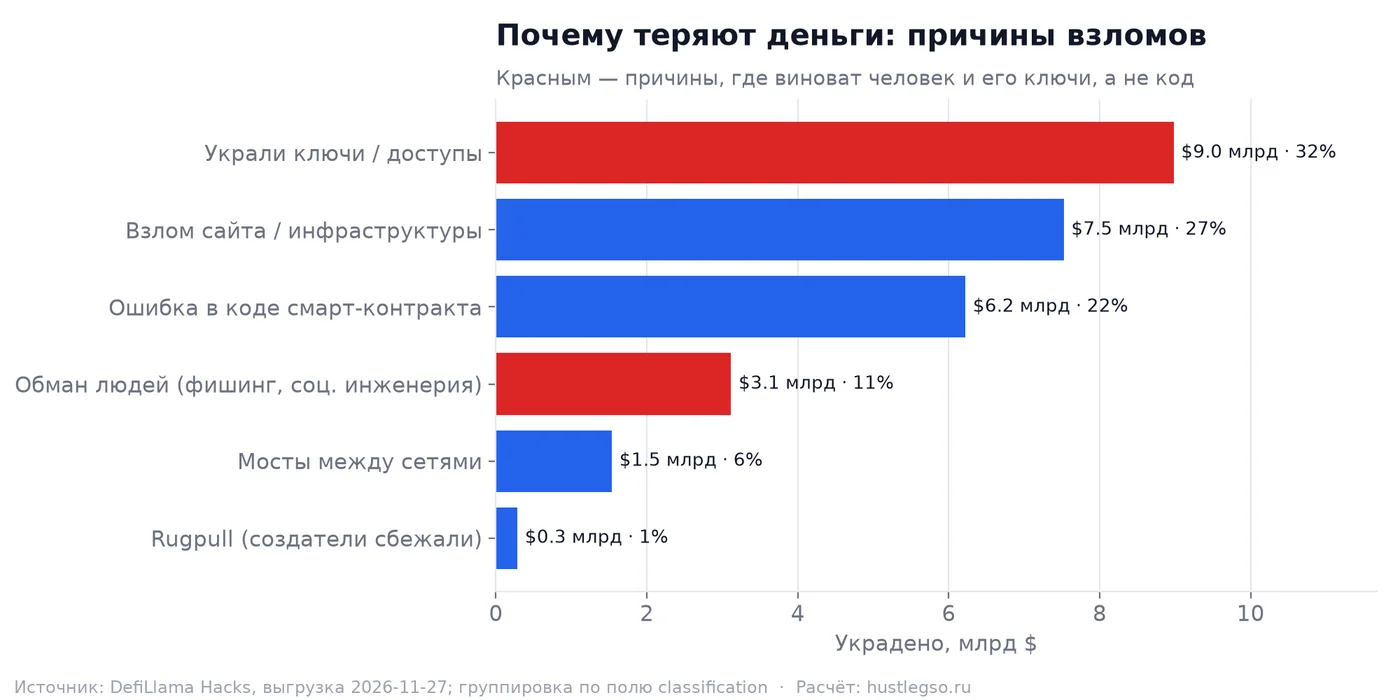
In the DefiLlama hacks database I went through, deceiving people (phishing and social engineering) accounts for about 11% of all money stolen in crypto, $3.1B. Together with leaked keys and compromised infrastructure, it's 70%. Only about 9% of stolen funds were ever recovered. Protection has to happen before, not after.
Step 1. Look at the address
The most common trap is a domain that differs by one character: an extra letter, "l" swapped for "I", a different ending, a hyphen.
- Check the whole address in the browser bar.
- Where did you come from? A search ad, a chat link, a comment under a post, a DM: all red flags.
- Confirm the project's official address in several places: its official site and X account, and its page on CoinGecko.
Step 2. Run the site through a scam check
I use the Sites.reviews scam check: paste the address and see the warning signs before you pay.
What to look at in the result:
- Domain age. A "major exchange" site that's two weeks old is almost certainly a copy.
- Blacklists. Whether the domain appears in phishing and fraud databases.
- Reviews. What people who've already used the service say.
The check shows warning signs; it doesn't deliver a verdict. A clean result doesn't make a service trustworthy, but a worrying one is a strong reason not to pay.
Step 3. Look at what the site asks for
Honest services and scams often differ not in design, but in what they want from you.
| What the site asks | OK? |
|---|---|
| Enter your seed phrase "to sync" or "to verify" | No. Always a scam |
| Connect your wallet to "claim a reward" you weren't expecting | Almost always a scam |
| Sign unlimited token spending permission (Approve, Permit, setApprovalForAll) just to "log in" | Stop |
| Pay extra "for verification" or a "withdrawal tax" | Scam |
| Enter your exchange password on a third-party site | Scam |
Schemes to recognize instantly
Wallet drainers
Copies of popular sites. Connecting your wallet usually doesn't take anything by itself. The danger is the next signature: after it, everything you gave access to is gone. Signs: a link from an ad or chat, an address that's off by a letter, urgency.
Fake airdrops
Unknown tokens or NFTs show up in your wallet with a "claim your reward" link. You weren't expecting them, and the link leads to a site that asks you to connect your wallet. Don't touch them, don't try to sell them, just hide them. More in airdrops: sell or hold.
Fake support
You post a question in a public group, and "support" DMs you. They rush you and ask for your seed phrase, your 2FA code, or to "move funds to a secure wallet". Real support never writes first.
"I'll help you recover your funds"
After a loss, "white-hat hackers" or "crypto lawyers" reach out. They want payment upfront or access to your wallet. It's the second wave of the same scam.
Address poisoning
You receive a tiny transfer from an address that looks like yours. Next time you copy the address from your history, and send your money to a thief. Never take an address from your transaction history. More in how to send crypto safely.
If someone messages you first, rushes you and promises money, close the chat. No real deal falls apart in 5 minutes of checking.
If you've already signed something suspicious
- Close the site.
- Open Revoke.cash, paste your wallet address, find the permission (approval) and revoke it.
- If what you signed wasn't a transaction but an off-chain permission signature (
Permitand similar), it may not show up in the approvals list until the scammer submits it on-chain. An empty list does not mean you're safe. Where your wallet or the protocol lets you cancel such a signature, cancel it; either way, quickly move the tokens it covers to another wallet you control. - Move any large balance to another wallet you control.
- If you entered your seed phrase, that wallet is compromised for good. Create a new one with a new seed phrase and move everything that's left.
Checklist before entering a password or connecting a wallet
- Full address checked; site opened from a bookmark or official source
- Domain run through a check: age, blacklists, reviews
- The site doesn't ask for your seed phrase or extra payments
- You understand the signature: to whom, which token, what amount
- For experiments, a separate wallet with a small balance
What's next
I post new scam patterns as I see them in my Telegram channel, @gusevself. For a personal review of how you store and move money, there's 1:1 mentorship.